How to Use the My Disney Experience App for Park Navigation
Let's be real. Fumbling with a giant, unfolded park map while dodging strollers and trying not to spill your Dole Whip is a rite of passage we can all happily retire. Your phone is now the ultimate park accessory. The My Disney Experience app isn't just a fancy digital map—it's your central nervous system for the entire trip. Think of it as your command center. Your pocket-sized genie. It pulls everything together: your tickets, your dining reservations, your hotel info. But where it truly shines? Getting you from Point A (desperately needing coffee) to Point B (the line for Space Mountain) without a shred of panic.
Watch Wait Times Like a Stock Ticker (And Win)
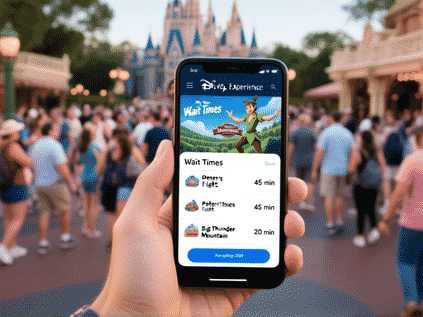
Here's the thing. Posted wait times on those fancy signs? They're a suggestion, not a prophecy. The app gives you the real-time, living, breathing pulse of the park. That 70-minute wait for Slinky Dog Dash might dip to 45 after the afternoon parade clears out the line. You need to check it constantly. Not obsessively, but strategically. I refresh it while in line for something else, or when we're sitting down for a snack. Saw Seven Dwarfs Mine Train jump to 120 minutes? Fine. Let's hit something with a 15-minute standby and come back later. The app turns you from a passive line-stander into an active ride strategist. Game on.
Order Lunch From the Standby Line (This is a Superpower)
Mobile food ordering is the single greatest innovation for parent-kind since the invention of the stroller. Seriously. You're 45 minutes deep into the queue for Pirates of the Caribbean. The kids are getting hangry. Instead of accepting your doom, you open the app, tap "Order Food," choose the nearest spot (Columbia Harbour House, maybe), customize your meals, and pay. You schedule the pickup for when you *think* you'll be off the ride. Then, you walk out of Pirates, get the "Your order is ready!" push notification, and stroll past a huge line of hungry, order-less people straight to the pickup window. You feel like a wizard. A smug, well-fed wizard.
Conquer Virtual Queues: Your Ticket to the New Stuff
For the big, new, headline attractions, you often can't just... wait. You need a boarding group. It's a digital lottery, and the app is your only ticket. Set an alarm. Have everyone in your party linked in the app. Be on your resort Wi-Fi or have killer cell service. At 7:00 AM sharp (or 1:00 PM for the second chance), you mash that "Join Virtual Queue" button like your vacation depends on it. It's stressful. It's a little ridiculous. But securing that spot for Guardians of the Galaxy: Cosmic Rewind is the modern-day equivalent of finding a Golden Ticket. It turns a potential 4-hour standby line into a simple notification telling you when to come back. Totally worth the 60 seconds of heart-pounding pressure.
The App is Your Plan, Not Your Boss
With all this talk of strategy and screens, here's my final piece of advice. The app is a tool to create freedom, not another chain. Use it to *avoid* spending your day in lines so you can spend it actually *doing* things. Or, you know, sitting on a bench with a churro, people-watching. Once you've snagged your virtual queue, ordered your lunch, and plotted your next ride based on wait times... put the phone away. Look at the castle. Watch the ducklings. The magic isn't in the pixels. It's in the time you get back. The app just helps you steal more of it.